Organized document packets
Combine related documents in one packet so recipients can review and sign within a single workflow.
FOR SMALL SERVICE BUSINESSES
Spend less time chasing signatures and keep document spending in view. Group your customer agreements into one packet, see the credit cost before sending, and track who still needs to sign.
Cancel before renewal. No automatic additional-credit purchases. Try packet preparation without a card. How we handle your data. Optional analytics stays off signing and account pages.
3 documents · 2 signers · One clear workflow
Prepare
→Send
→Sign
→Complete
CONTROL THROUGHOUT THE WORKFLOW
Manage preparation, signer coordination, and follow-up in one workflow, with features matched to your plan.
Combine related documents in one packet so recipients can review and sign within a single workflow.
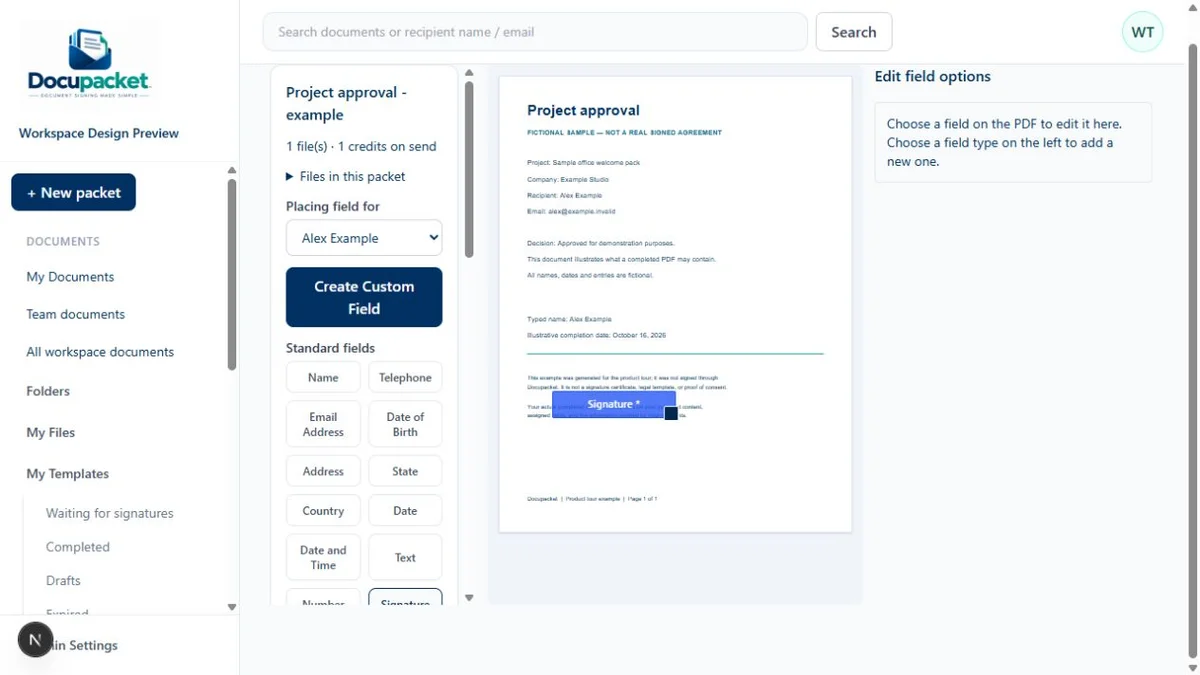
Place and assign signature, date, text, and selection fields to the appropriate recipients.
Use saved files and packet templates to standardize recurring document preparation.
Invite signers simultaneously or establish a defined signing order for each packet.
Recipients open their invitation and sign in a browser, on a computer, tablet or phone.
Monitor packet status, follow up with plan-supported reminders, and review account credit usage.
Feature availability varies by plan. Compare what’s included
PREPARE. COORDINATE. COMPLETE.
See how documents move through each stage of the signing workflow.
Related documents, organized in one packet.
YOUR WORKSPACE, ORGANIZED
Search by recipient name or email, then narrow the list to sent, completed, draft, expired or cancelled packets.
Use personal folders for your work and Team folders organized by document type, client or project.
Workspace administrators can access workspace documents and choose which members can open each Team folder.
Check available credits in Usage and review your membership, renewal information and payment history in Payments.
Submit a support request through Get Support. Keep the ticket number and reply to the support email while the ticket remains open.
Features and team seats vary by plan. Folder access stays within your organization.
BUILT AROUND BUSINESS OPERATIONS
Choose a workflow that fits how your team works, whether you send one agreement or repeat the same process every week.
Bring service agreements, project details and welcome forms into the same packet.
Explore your optionsUse templates for recurring acknowledgments, internal forms and onboarding documents.
See the workflowExplore team seats, bulk sending, API access and embedded signing in eligible plans.
Discuss your requirementsSending a few contracts a month? Start with Individual, review the included credits and any extras, and choose a predictable cost for the work you actually send.
Explore IndividualBuilt for customer agreements and everyday business forms. Not for protected health information or workflows that require certifications we have not attained. Review the current scope.
WHAT MAKES DOCUPACKET DIFFERENT
Review the exact credit usage before sending. One credit per packet. Unlimited files and pages on every plan, including Individual. Upload limits: 20 MB per file and 100 MB per packet. Sending holds the credits; they are consumed once at least one signer completes signing. Subscription fees are separate from packet-credit usage.
Unused included monthly credits on Standard, Standard Plus, and Pro roll over for 12 months from issuance. Individual’s included credits expire at the next monthly allocation. New credits do not extend older credits.
Understand packet creditsThe packet’s credit cost is reserved when you send it.
The held credits are consumed once at least one signer completes signing, even if other signers remain pending.
If nobody completes signing and the packet is voided or expires, held credits return. Returned credits retain their original expiration date; credits past that date expire when returned.
INFORMED BY OPERATIONAL EXPERIENCE
Docupacket was created to give teams greater clarity over document usage and spending. Ultimate Security and Safe is currently piloting the platform for customer quotes, service contracts, and engagement agreements.
TRANSPARENT PLANS AND PRICING
Compare published memberships, included credits and features.
Choose your plan, verify your email, and sign your filled agreement before completing payment setup.
Loading current published plans…
Membership prices and availability are checked before checkout.
Try packet preparation without an accountReview every plan detail. View full plans and pricing
U.S. law generally does not deny a signature legal effect solely because it is electronic. Validity still depends on the document, consent and applicable rules; an audit trail is evidence of activity, not a guarantee of enforceability. Docupacket records document activity for review. Read our security page for controls and limitations, and confirm requirements for your documents. Security and audit information. U.S. electronic-signature law.
Upload your source PDFs, or supported Word files when included in your plan, then mark where they sign and assign recipients. Existing provider templates, field assignments and signing history do not import automatically. Rebuild those templates, try a fictional packet, and keep your original signed files and audit records.
Compare the full membership plus any additional credits with what you actually send. A membership can suit recurring work when its included credits and features fit; pay-per-document or a free allowance elsewhere may cost less for occasional sends. Use the cost example before choosing.
Unused included monthly credits on Standard, Standard Plus, and Pro roll over for 12 months from issuance. New credits do not restart the clock on older credits. The Individual plan is the exception: its included credits expire at the next monthly allocation. Purchased extra credits and complimentary credits last 12 months, including on Individual. Existing grandfathered terms are honored.
A packet is a group of documents sent together for signatures. It can contain multiple files and multiple signers. One credit per packet. Unlimited files and pages on every plan, including Individual. Upload limits: 20 MB per file and 100 MB per packet.
No. Recipients use the signing link in their invitation to open the packet, complete their assigned fields and sign. They do not need to buy a subscription.
Yes, when Word uploads are included in your plan. DocuPacket converts supported Word files to PDF. Review the converted pages before placing fields and sending.
Docupacket displays credit usage before sending. One credit per packet. Unlimited files and pages on every plan, including Individual. Upload limits: 20 MB per file and 100 MB per packet. Sending holds those credits; they are consumed once at least one signer completes signing. If nobody completes signing and the packet is voided or expires, held credits return, subject to their original expiration date. Credits past that date expire when returned. Additional credits are never purchased automatically.
Plans with templates and bulk sending let you create a separate packet for each recipient. Review the recipient list and total credit cost before sending.
No. Each published plan lists its included features, credits, team seats and document limits. Review those details before choosing a plan, or contact sales if you need a different fit.
DOCUMENTS TOGETHER. BUSINESS FORWARD.
THE FOUNDING 100 LAUNCH OFFER
Assess Docupacket in your document workflow with the Individual plan’s included credits. Prepare agreements, request signatures, and monitor progress during the introductory period.
Enter FOUNDER at checkout for 2 FREE billing cycles of the monthly Individual membership.
Cancel anytime before renewal. Held credits return if nobody has completed signing and you cancel the packet, subject to their original expiration. Try packet preparation without a card.
Coupon entry is required; the offer is not applied automatically. The discount covers the Individual membership fee for the first two billing cycles, not additional credit purchases. A payment card and signed agreement are required. The subscription then renews automatically at $10 per month unless you cancel before renewal. Billing cycles follow the calendar schedule shown at checkout; two cycles do not necessarily equal 60 days. Review the discount and payment dates before confirming. Offer subject to availability.
Understand your cost
A set of files sent together to recipients. One credit per packet. Unlimited files and pages on every plan, including Individual. Upload limits: 20 MB per file and 100 MB per packet.
Sending reserves credits. They are consumed when the first recipient completes signing. If nobody completes signing and the packet expires or is cancelled, the held credits return with their original expiration date.
Memberships renew automatically unless cancelled before renewal. Annual memberships are paid yearly, with monthly credit allocations. Enterprise has a yearly platform fee and no monthly credit allowance.
Additional credits are never purchased automatically. Review the exact packet cost before sending. Expired credits do not become usable again when a hold is released. See each plan’s credit expiration terms below.
Got a renewal email with a higher bill? Put your current monthly invoice beside this estimate for the same number of packets and senders. Compare the full cost, including extra credits and the features you use.
One active member, a full monthly allowance, and no carried-over credits or discounts. This is an illustration, not a charge or checkout quote.
10 packets × 1 credit(s) = 10 credits. Your first member’s allowance covers 5; this example needs 5 additional credits.
$10 membership + $25 additional credits = $35 for this example.
Uses the current published monthly price. Actual purchases may have minimum quantities. Additional members, optional services and discounts can change the total. Annual prices and Enterprise volume purchases are shown separately.
Select two or three plans to compare side by side.
1 of 3 plans selected
For solo professionals sending customer contracts
$10 / month
$10 monthly membership includes 5 credits for one user. Additional credits are separate.
Additional credits: $5 per credit
Included monthly credits expire at the end of that billing month. Extra purchased and complimentary credits expire 12 months after issue.
One credit per packet. Unlimited files and pages on every plan, including Individual. Upload limits: 20 MB per file and 100 MB per packet.
Included monthly credits expire at the end of that billing month. Extra purchased and complimentary credits expire 12 months after issue.
One credit per packet. Unlimited files and pages on every plan, including Individual. Upload limits: 20 MB per file and 100 MB per packet.
Extra joined seats: No extra charge within the 1-seat limit. Pending invitations do not count. All credits are shared. New members add credits at the next paid monthly renewal.
Renews automatically. Cancel before the next renewal. There is no advance-day notice requirement.
Recommended for small teams
For small teams sharing customer work
$29 / month
5 seats for one $29 monthly membership; $5.80 per seat when all are joined. Additional credits are separate.
Additional credits: $4 per credit
Unused credits bank for 12 months from the date each batch is issued. New credits do not extend older credits.
One credit per packet. Unlimited files and pages on every plan, including Individual. Upload limits: 20 MB per file and 100 MB per packet.
Unused credits bank for 12 months from the date each batch is issued. New credits do not extend older credits.
One credit per packet. Unlimited files and pages on every plan, including Individual. Upload limits: 20 MB per file and 100 MB per packet.
Extra joined seats: No extra charge within the 5-seat limit. Pending invitations do not count. All credits are shared. New members add credits at the next paid monthly renewal.
Renews automatically. Cancel before the next renewal. There is no advance-day notice requirement.
For teams expanding their document workflows
$45 / month
Additional credits: $3 per credit
Unused credits bank for 12 months from the date each batch is issued. New credits do not extend older credits.
One credit per packet. Unlimited files and pages on every plan, including Individual. Upload limits: 20 MB per file and 100 MB per packet.
Unused credits bank for 12 months from the date each batch is issued. New credits do not extend older credits.
One credit per packet. Unlimited files and pages on every plan, including Individual. Upload limits: 20 MB per file and 100 MB per packet.
Extra joined seats: No extra charge within the 10-seat limit. Pending invitations do not count. All credits are shared. New members add credits at the next paid monthly renewal.
Renews automatically. Cancel before the next renewal. There is no advance-day notice requirement.
For busy teams with recurring customer paperwork
$50 / month
Additional credits: $2.50 per credit
Unused credits bank for 12 months from the date each batch is issued. New credits do not extend older credits.
One credit per packet. Unlimited files and pages on every plan, including Individual. Upload limits: 20 MB per file and 100 MB per packet.
Everything in Standard Plus, with these highlights:
Unused credits bank for 12 months from the date each batch is issued. New credits do not extend older credits.
One credit per packet. Unlimited files and pages on every plan, including Individual. Upload limits: 20 MB per file and 100 MB per packet.
Extra joined seats: No extra charge within the 25-seat limit. Pending invitations do not count. All credits are shared. New members add credits at the next paid monthly renewal.
Renews automatically. Cancel before the next renewal. There is no advance-day notice requirement.
For organizations buying credits at volume rates
$300 / year
Annual platform fee. No monthly credit allowance.
Includes 75 credits once at initial activation. Initial total: $300 before any approved discount. Additional credit purchases are optional.
Paid purchases in the previous 12 calendar months determine graduated rates: credits 1–1,000 at $1.99; 1,001–2,500 at $1.89; 2,501–5,000 at $1.79; 5,001–10,000 at $1.69; above 10,000 at $1.50. Each rate applies to its band. Purchased credits expire 12 months after purchase.
Additional credits: Graduated volume rates: $1.99–$1.50 per credit.
Unused credits bank for 12 months from the date each batch is issued. New credits do not extend older credits.
One credit per packet. Unlimited files and pages on every plan, including Individual. Upload limits: 20 MB per file and 100 MB per packet.
Unused credits bank for 12 months from the date each batch is issued. New credits do not extend older credits.
One credit per packet. Unlimited files and pages on every plan, including Individual. Upload limits: 20 MB per file and 100 MB per packet.
Extra joined seats: No extra charge within the 1-seat limit. Pending invitations do not count.
Renews automatically. Cancel before the next renewal. There is no advance-day notice requirement.
3 live small business customers. 1 active pilot.
Confirmed October 16, 2026. Pilot: Ultimate Security and Safe.
CUSTOMER WORKFLOW PILOT
Three customer workflows: quotes, service contracts, and engagement agreements. The pilot follows document preparation, customer signing and completed-file retrieval.
Measured results and approved customer testimonials have not yet been published.
Read the pilot scopeUsed Docupacket? Share your honest experience on Trustpilot. Feedback is welcome whether positive or critical.
Card payments are processed by Stripe. Review the price, any coupon discount, and renewal schedule before you confirm.